
Multi-Company HR Management
Use companies and nested departments to organise people and support the leave, approval and access settings around them.
Reflect your structure
Organise employees into companies and nested departments, so your HR workspace follows the way your business is arranged.
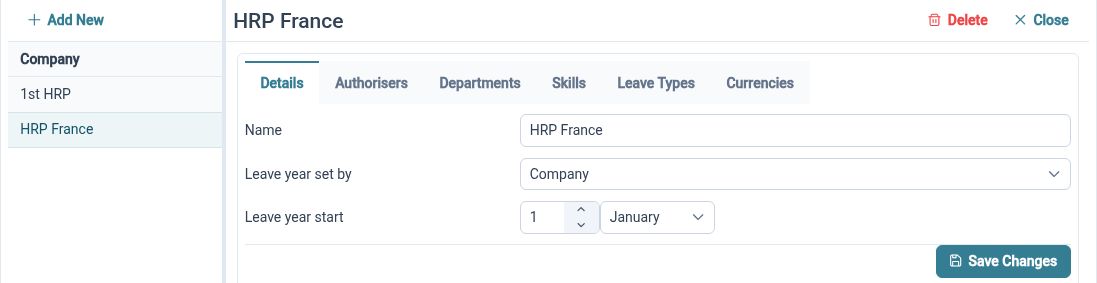
A single flat employee list can be difficult to work with when a business has several companies or layers of departments. HR Planner lets you maintain that structure and place employees in the relevant organisational context. The same hierarchy can then support employee navigation and other HR configuration.
For example, a group with a services company and a distribution company could organise each into its own departments. A central HR team can use those groupings when reviewing records, while individual teams have a clearer place within the wider organisation. This is company structure within HR Planner, with access set separately.
Put people in context
Bring reporting relationships and location details alongside employee records, helping teams understand where people work and who they report to.

Company, department, reporting-line and location information answer different questions about an employee. An organisation chart makes reporting relationships visible, while location records provide office details and time-zone context. Keeping these pieces connected makes the employee directory more useful than a list of names alone.
For example, someone in a regional office might belong to a central finance department and report to a manager at another location. Recording those relationships separately gives HR a clearer picture of the arrangement. Colleagues can use the directory and chart to navigate the information they are permitted to access.
Share rules sensibly
Use organisational structure when configuring leave policies and approval responsibilities, with local variations where they are needed.
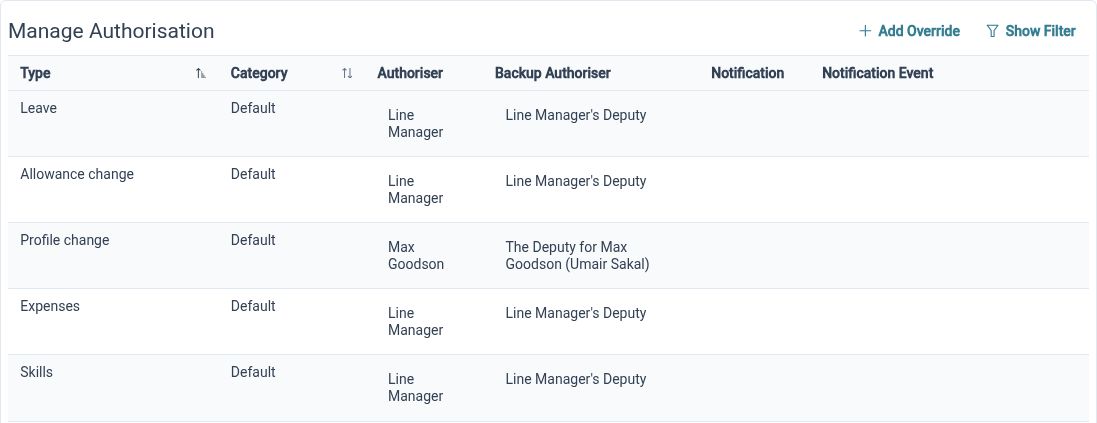
The hierarchy has a practical role in everyday HR administration. Leave and approval settings can use inherited configuration, while supported organisational settings allow custom arrangements. This gives administrators a way to reuse common rules without assuming every company or department must follow an identical process.
For example, most departments could follow a shared leave approval arrangement, while one business unit needs a different authoriser. Set the common configuration first, then review the local exception in its own context. Checking inheritance alongside the organisation structure makes responsibility easier to understand when teams change.
Built for everyday HR

Recognisable organisation
Group employee records around the companies and departments your team actually uses.

Useful local context
Keep office and reporting information connected to the people it describes.

Reusable configuration
Apply shared settings with deliberate local variations instead of repeating every setup task.
Explore connected HR features
Employee Records Software
Staff Availability and Leave Planner
HR Approval Workflow Software

Ready to take our software for a spin?
Organisations just like yours are using HR Planner. Start your free trial today to see how simple it can be!