
Simpler HR Admin
Spend less effort finding information, repeating questions and passing requests between inboxes. Give everyday HR tasks a clear place to start, a person responsible and a route to review.
Routine HR work often involves several small steps: answering a question, finding a file, asking for missing information and checking who should review a request. Each step may be simple, but the interruptions add up when the process depends on one person keeping everything moving.
HR Planner helps you organise that work through connected self-service, forms, assignments and approvals. Start with a task that causes regular back-and-forth, decide what information and review it needs, then give the people involved a clear way to complete it.

Let people act
Give Employees access to their own information and the record or request actions their permissions allow.
Employee Self-Service provides a personal profile route and permitted actions over employee records and requests. Read, propose and edit rights let HR Administrators match access to the organisation's process. That gives Employees a direct starting point for routine tasks while preserving review where a change needs another person's involvement.
For example, an Employee notices an outdated detail in their profile. Instead of first asking HR where the information is held, they can use the available update or proposal route. Show Employees which actions are available and explain how proposed changes are reviewed, so the new process is easy to follow.
Ask consistently
Create reusable HR forms so recurring information requests start with an agreed set of questions.
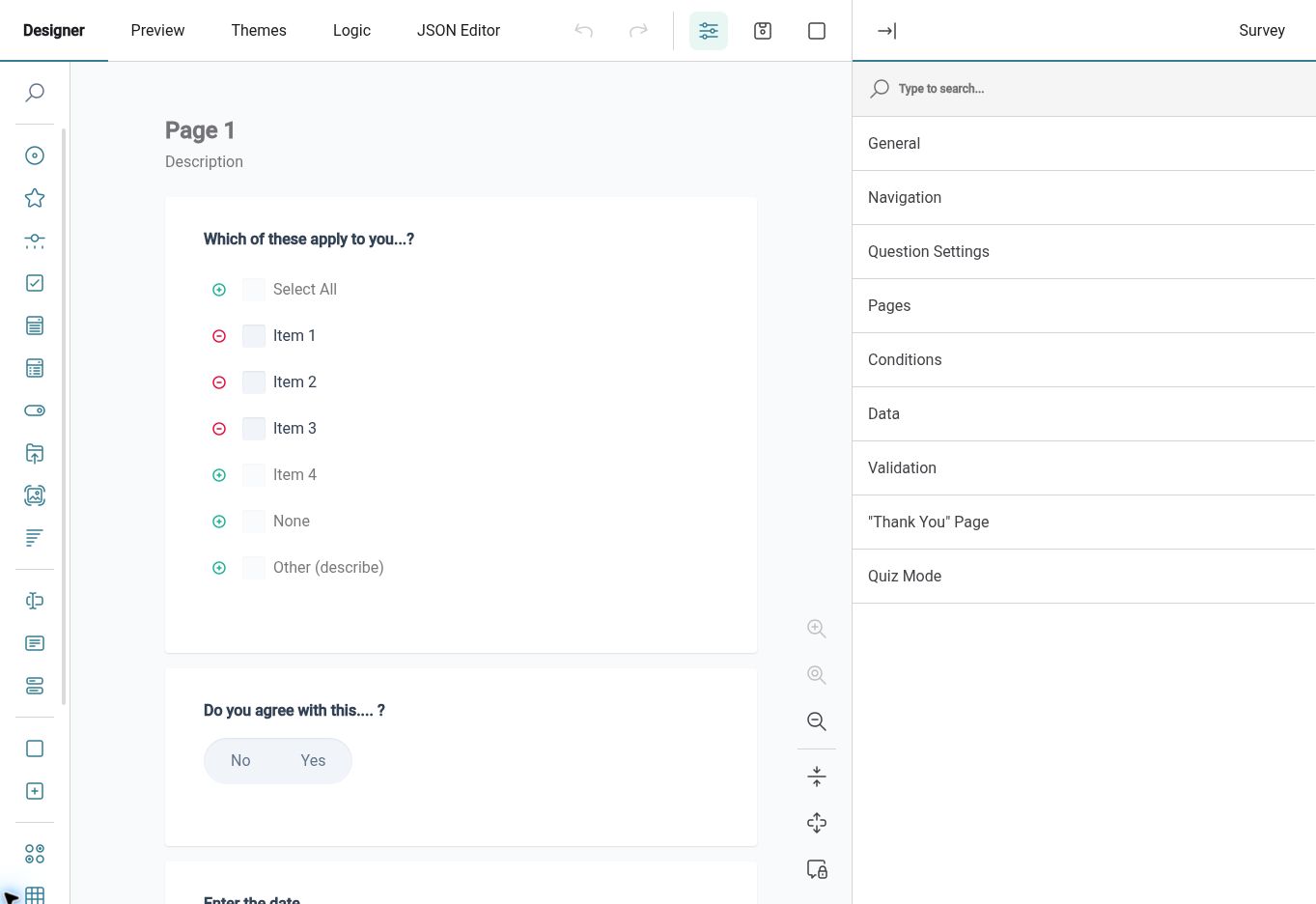
The HR Form Builder lets authorised users create form definitions, arrange questions and preview the experience. A form's configured submission type determines whether it is available for surveys, assignments or feedback. Reusing a suitable definition gives HR a consistent starting point instead of rebuilding the questions each time a similar task arises.
For example, HR regularly needs the same details before considering an internal request. A short form can ask those questions together and explain the information required. Review the wording and preview the form before use, then check that its configured submission type fits the process you intend to run.
Assign ownership
Give a form to a named Employee when the task needs individual completion and a defined review process.
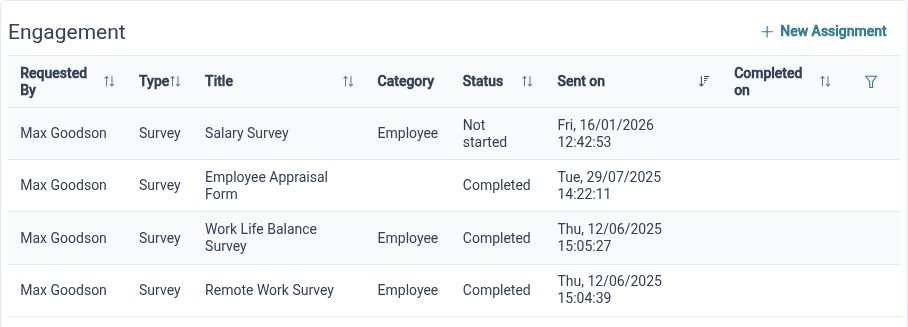
Employee Form Assignments connects eligible form definitions to Employees through a request and authorisation process. This is useful when HR needs information from a particular person rather than responses to a general survey. The form and configured workflow provide the context for completion and review, helping the team distinguish who supplies the information from who considers it next.
For example, an Employee needs to provide details for a specific internal request. HR assigns the appropriate form, the Employee completes it and the configured process provides a route for review. Agree those responsibilities in advance so the task does not depend on someone remembering the next step in an email chain.
Clarify reviews
Configure authorisation structures around your HR processes so requests have an agreed route for review.
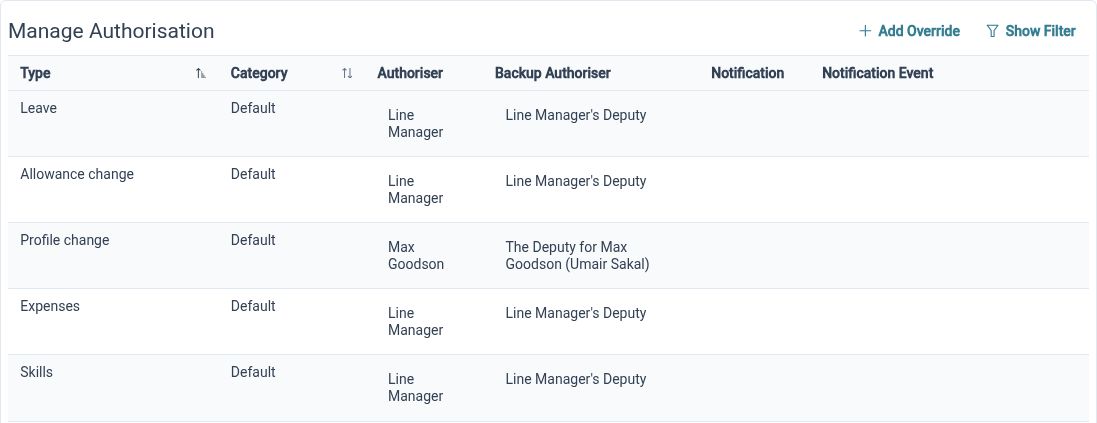
HR Approvals supports authorisation structures across processes including leave, allowances, profile changes, expenses, skills and assignments. Different requests can need different review arrangements, even when the same people are involved. Define the structure that fits the process and check what the Employee and Reviewer will see before putting it into everyday use.
For example, a business wants expense requests reviewed through a consistent process rather than forwarded between inboxes. HR can configure the relevant authorisation structure and explain who handles the review. The software supports that request process; your organisation still decides the policy, the outcome and any subsequent payment arrangements.
Find the files
Use an organised HR document library to browse files and view the details available to your role.
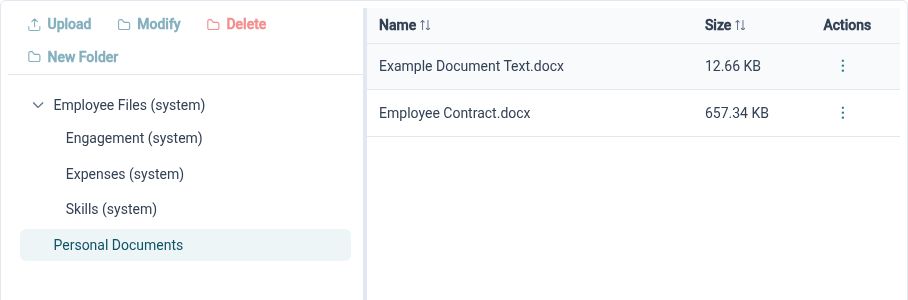
HR Document Management provides a folder tree, document lists or thumbnails, and document detail and viewing actions. The library supports files used across employee records and related HR activities, including expense receipts and certificate evidence. Agree a practical structure and the appropriate document access so people know where to look when a task needs supporting information.
For example, an authorised HR Administrator reviewing an employee record may need to inspect relevant supporting evidence. Browsing the organised library gives them a defined place to look instead of asking who last received the attachment. Clear naming and sensible organisation remain useful habits as the number of files grows.
Focus your view
Arrange available dashboard widgets around the information you check most often at the start of the day.
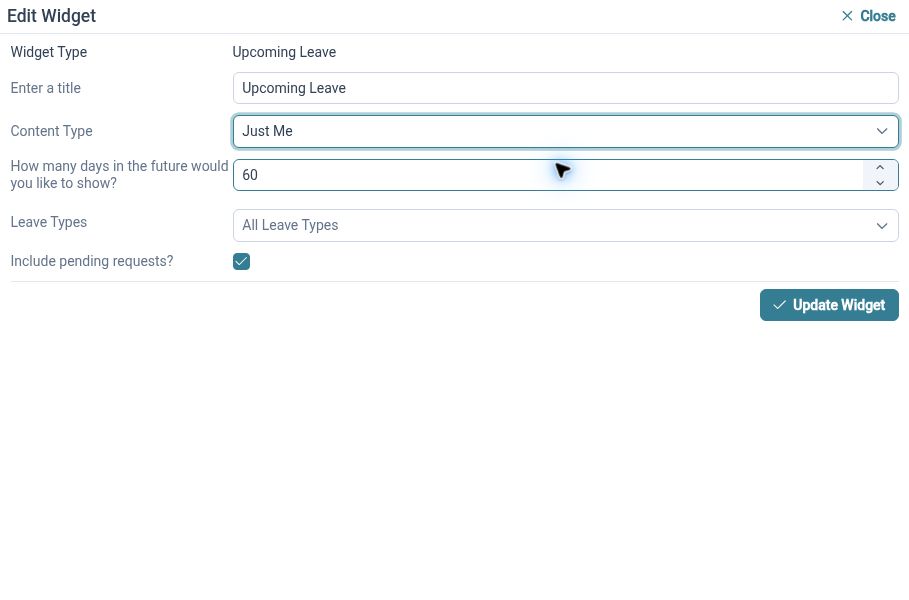
HR Dashboards allows users to add, remove and arrange available widgets, with saved home and employee layouts. Supported widgets include task summaries, recent request activity and upcoming leave. A relevant overview helps an authorised user decide what to look at next, while the underlying request or record provides the detail needed to act.
For example, an HR Administrator can arrange a dashboard around the available task and request information they review regularly. They can then open the relevant item to investigate or continue the work. Choose widgets for a clear purpose and review the layout as responsibilities change, rather than assuming every role needs the same overview.
Clear steps for everyday HR

Employees
Use available self-service actions and complete assigned forms through a clear route, with less need to ask where a task starts.

Managers
Review the requests your role permits with the relevant information and configured process available to you.

HR Administrators
Reuse suitable forms, organise document access and configure review responsibilities around the work your team handles regularly.
Explore the supporting tools
Employee Self-Service
HR Form Builder
HR Approvals
Your questions answered
Which HR task should we improve first?
Choose a recurring task with a clear owner and repeated questions or handovers. Identify the information and review it needs, then test the relevant HR Planner process with the people who will use it. A focused starting point makes the change easier to explain and assess.
Can Employees edit everything in their own records?
No. Available actions depend on permissions. Read, propose and edit rights allow self-service to reflect your organisation's approach. Review the intended access and explain which changes Employees can make directly and which require review.
How do forms and assignments work together?
The HR Form Builder creates reusable definitions. An eligible form can be assigned to an Employee through the configured request and authorisation process. Check the form's submission type and review steps before using it for a particular task.
How can we tell whether the new process is helping?
Compare the same task before and after the change. Your team could record how often information is missing, how many manual follow-ups are needed and whether responsibilities are clear. These are suggested measures for your own review, rather than claims of built-in productivity reporting or guaranteed savings.

Ready to take our software for a spin?
Organisations just like yours are using HR Planner. Start your free trial today to see how simple it can be!